The SG90 is a compact, lightweight 9g micro servo motor (TowerPro) designed for precise position control in robotics and DIY projects. Its tiny size and dependable performance make it a favourite choice for students, hobbyists and makers building Arduino and robotics projects.
SG90 Micro Servo Specifications
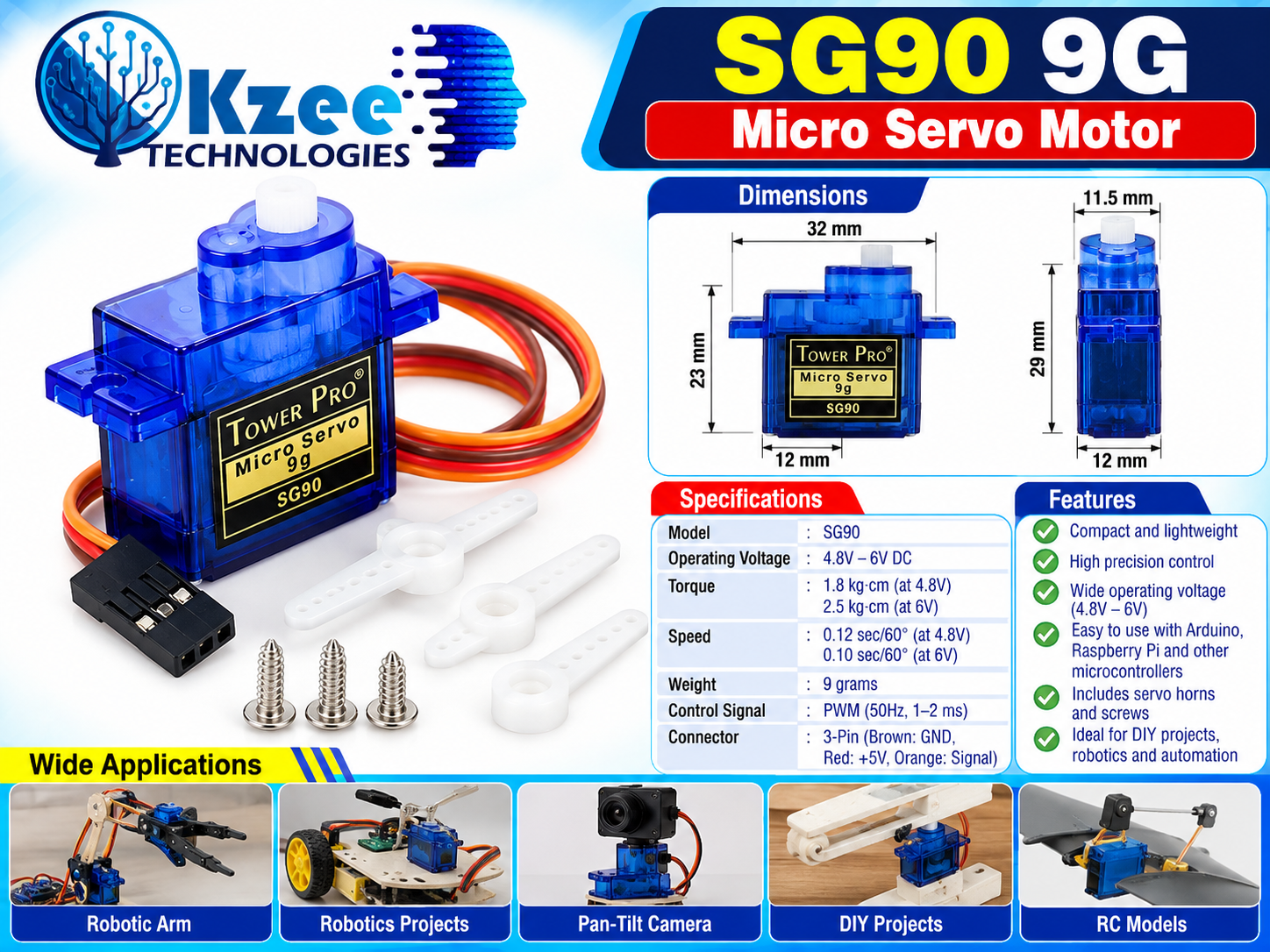
- Model: SG90 (TowerPro) micro servo motor
- Operating voltage: 4.8V–6V DC
- Torque: 1.8 kg-cm at 4.8V; 2.5 kg-cm at 6V
- Speed: 0.12 sec/60° at 4.8V; 0.10 sec/60° at 6V
- Weight: 9 grams
- Control signal: PWM (50Hz, 1–2 ms pulse)
- Connector: 3-pin — Brown: GND, Red: +5V, Orange: Signal
- Dimensions: approx. 23 x 12 mm body with 32 mm mounting flange
- Package includes: servo horns and mounting screws
Features
- High precision position control
- Wide operating voltage (4.8–6V)
- Easy to use with Arduino, Raspberry Pi and other microcontrollers
Wiring the SG90 to an Arduino
Connecting the SG90 is simple — it uses a 3-pin lead. Wire it to your Arduino UNO R3 as follows:
- Brown wire → GND
- Red wire → 5V
- Orange wire → Arduino PWM pin (e.g. D9)
Use jumper wires to make the connections, and if you are running several servos at once, power them from a stable external 5V supply (a 12V adapter stepped down to 5V works well) with a common ground to the Arduino.
Arduino Example Code
The sketch below uses the Arduino Servo library to sweep the SG90 from 0 to 180 degrees on pin 9:
#include <Servo.h>

Servo myServo;

void setup() {
  myServo.attach(9);  // attach the orange signal wire to digital pin 9
}

void loop() {
  // sweep from 0 to 180 degrees
  for (int pos = 0; pos <= 180; pos += 1) {
    myServo.write(pos);
    delay(15);
  }
  // sweep back from 180 to 0 degrees
  for (int pos = 180; pos >= 0; pos -= 1) {
    myServo.write(pos);
    delay(15);
  }
}
Applications
- Robotic arms
- Robotics projects
- Pan-tilt camera mounts
- DIY projects
- RC models
Frequently Asked Questions
1. What voltage does the SG90 micro servo need?
The SG90 operates on 4.8V–6V DC, so it can run directly from the 5V pin of an Arduino UNO or any regulated 5V supply.
2. How much torque does the SG90 produce?
It delivers 1.8 kg-cm of torque at 4.8V and up to 2.5 kg-cm at 6V, with a speed of 0.12 sec/60° at 4.8V and 0.10 sec/60° at 6V.
3. How do I connect the SG90 to an Arduino?
Connect the brown wire to GND, the red wire to 5V, and the orange wire to a PWM-capable pin such as D9. Then control it with the Arduino Servo library, as shown in the example code above.
4. What is the difference between the SG90 and a continuous rotation servo?
The SG90 is a positional servo: it rotates to and holds a commanded angle (typically 0–180 degrees). A continuous rotation servo cannot hold a position — it spins continuously and is controlled for speed and direction instead of angle.
5. What is included in the package?
The package includes the SG90 servo motor along with servo horns and mounting screws.
6. Can the SG90 be used with an ESP32 or Raspberry Pi?
Yes. The SG90 accepts a standard PWM control signal (50Hz, 1–2 ms pulse), so it works with an ESP32, a Raspberry Pi or any other microcontroller — just provide a stable 5V supply and a common ground with your board.