
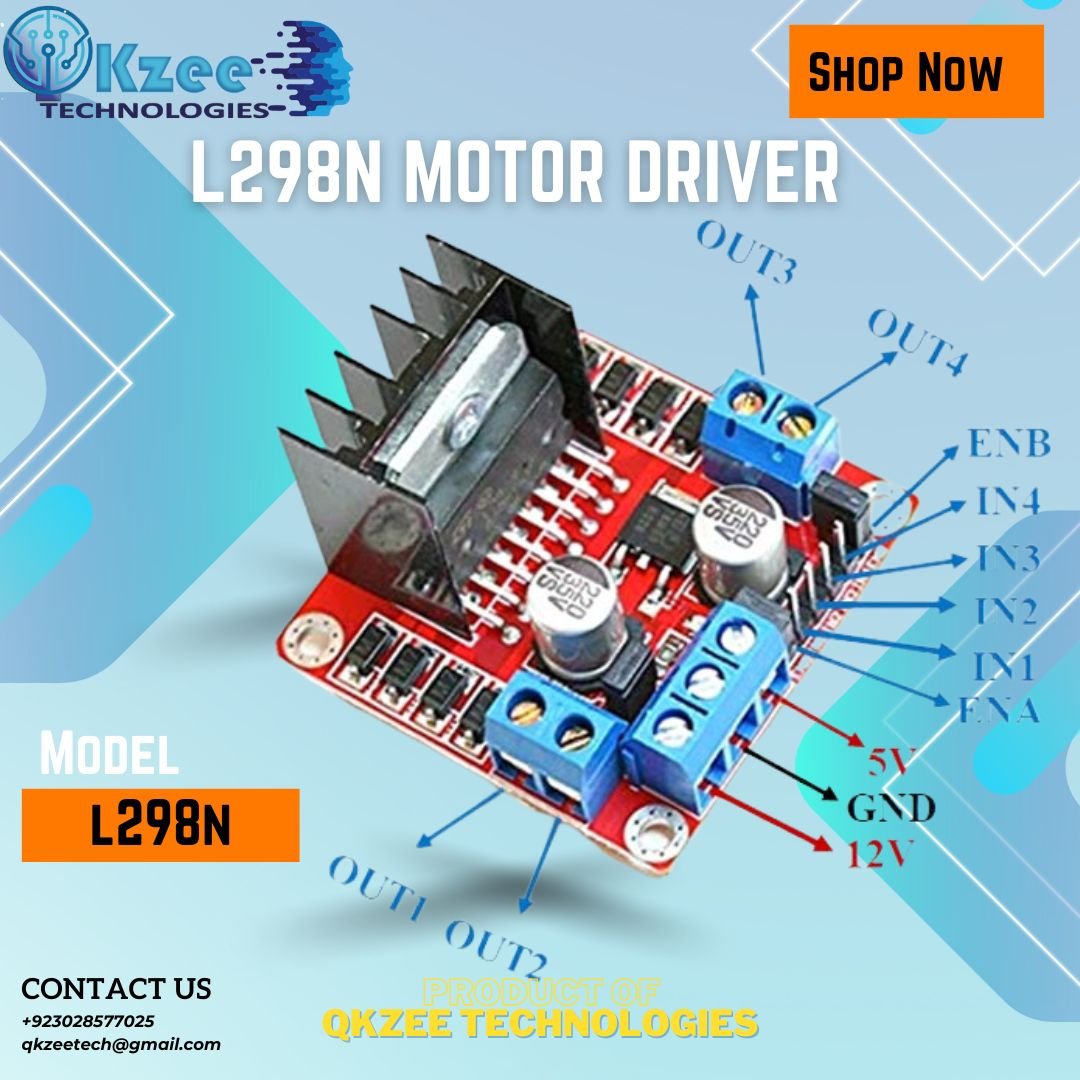
L298N Dual H-Bridge Motor Driver Best Price in Lahore, Pakistan
₨430 Original price was: ₨430.₨375Current price is: ₨375.
you can payment online thorugh Easypaisa, jazzcash, Raast
Cash on Delivery All over Pakistan
Direct Bank Transfer Payments
🚚 Delivery: Rs 350 all over Pakistan — 3 to 4 working days. Cash on Delivery available. Order on WhatsApp: +92-302-8577025 / +92-336-4459320
About this item
- H-Bridge Configuration: Dual H-Bridge (control two DC motors independently)
- Output Current: Up to 2A per channel (perfect for various motor sizes)
- Logic Supply Voltage: 5V DC (compatible with most microcontrollers)
- Motor Supply Voltage: 7V to 12V DC
What is the L298N Motor Driver?
The L298N is a dual H-bridge motor driver module — the standard way to control motors with an Arduino in Pakistan. It lets one Arduino drive two DC motors independently (forward and reverse, with speed control) or one bipolar stepper motor. It is the driver inside almost every Arduino robot car, line follower and final-year project.
The module handles the heavy current the motors need, so the Arduino only sends small control signals. That is the whole point: the Arduino thinks, the L298N does the heavy lifting.
Key Specifications
| Specification | Value |
|---|---|
| Driver chip | L298N dual H-bridge |
| Motor supply voltage | 5V to 35V DC |
| Logic supply voltage | 5V DC |
| Output current | Up to 2A per channel (continuous), 3A peak |
| Motors supported | 2 × DC motors, or 1 × bipolar stepper motor (4-wire) |
| Speed control | PWM via ENA and ENB pins |
| Control inputs | IN1, IN2, IN3, IN4 (direction) |
| Motor outputs | OUT1, OUT2, OUT3, OUT4 |
| Onboard regulator | 5V output (see the jumper rule below) |
One thing to know: the L298N drops about 2V inside the chip, so a 12V supply gives roughly 10V at the motor. That is normal for this module — if your motor runs slower than expected, the voltage drop is the reason, not a fault.
Wiring with Arduino UNO
| L298N Pin | Arduino UNO Pin / Connection |
|---|---|
| 12V | Motor power supply (e.g. 12V adapter or battery pack) |
| GND | GND — common ground with the Arduino (must be joined) |
| 5V | Arduino 5V pin — only when the 5V jumper is fitted |
| IN1 | D8 |
| IN2 | D9 |
| IN3 | D10 |
| IN4 | D11 |
| ENA | D5 (PWM — remove the ENA jumper first) |
| ENB | D6 (PWM — remove the ENB jumper first) |
| OUT1, OUT2 | Motor A |
| OUT3, OUT4 | Motor B |
The 5V jumper rule: with the jumper fitted (the default) and a motor supply of 12V or less, the module’s onboard regulator makes 5V that can power the Arduino. If the motor supply is above 12V, remove the jumper and feed 5V into the 5V pin from a separate source — otherwise the regulator overheats.
Common ground is not optional: the Arduino GND and the motor supply GND must be connected together. Without it, the control signals have no reference and the motors will not run.
How It Works
Each motor has two direction inputs and one enable pin. IN1/IN2 set motor A’s direction (HIGH/LOW = forward, LOW/HIGH = backward, LOW/LOW = stop) and IN3/IN4 do the same for motor B. ENA and ENB take a PWM value (0–255) that sets the speed — but only after you remove their jumpers. With the jumpers fitted, the enable pins are tied to 5V and the motors run at full speed no matter what the code says.
Arduino Code — Two DC Motors with Speed Control
// L298N motor driver — two DC motors with speed control
const int in1 = 8; // Motor A direction
const int in2 = 9; // Motor A direction
const int in3 = 10; // Motor B direction
const int in4 = 11; // Motor B direction
const int ena = 5; // Motor A speed (PWM)
const int enb = 6; // Motor B speed (PWM)

void setup() {
  pinMode(in1, OUTPUT);
  pinMode(in2, OUTPUT);
  pinMode(in3, OUTPUT);
  pinMode(in4, OUTPUT);
  pinMode(ena, OUTPUT);
  pinMode(enb, OUTPUT);
}

void loop() {
  // Both motors forward at 200/255 speed
  digitalWrite(in1, HIGH); digitalWrite(in2, LOW);
  digitalWrite(in3, HIGH); digitalWrite(in4, LOW);
  analogWrite(ena, 200); analogWrite(enb, 200);
  delay(2000);

  // Both motors backward
  digitalWrite(in1, LOW); digitalWrite(in2, HIGH);
  digitalWrite(in3, LOW); digitalWrite(in4, HIGH);
  analogWrite(ena, 200); analogWrite(enb, 200);
  delay(2000);

  // Stop
  digitalWrite(in1, LOW); digitalWrite(in2, LOW);
  digitalWrite(in3, LOW); digitalWrite(in4, LOW);
  delay(1000);
}
Remove the ENA/ENB jumpers before uploading, or the PWM speed values will have no effect. For the full step-by-step build, see our L298N beginner’s guide and our obstacle-avoidance robot car guide — it uses this same L298N wiring with an HC-SR04 ultrasonic sensor.
Where to Use It
- Robot cars: the driver in almost every Arduino robot car — two DC gear motors, forward, reverse, turns and speed control.
- Line followers and obstacle avoiders: pair it with IR sensors or an HC-SR04 and the robot steers itself.
- Bipolar stepper motors: drives one 4-wire stepper (two coils) — for an L298N stepper use a bipolar motor such as the NEMA 17. The common 28BYJ-48 is unipolar (5-wire) and is normally driven by its own ULN2003 driver board, not by the L298N.
- Student and final-year projects: motor control is the heart of most robotics FYPs, and this module is the simplest reliable way to do it.
What You Get
1 × L298N dual H-bridge motor driver module with heatsink, tested before dispatch. Jumper wires and motors are not included — add them below if you need them.
Frequently Asked Questions
Q1: The motors do not move even though the code uploaded. Why?
The most common cause is a missing common ground: the Arduino GND and the L298N GND must be joined. The second most common cause is no motor power — check that the 12V supply is connected and switched on.
Q2: The motors run at full speed even though I set a PWM value. Why?
The ENA/ENB jumpers are still fitted. Remove them and connect ENA/ENB to PWM pins (5 and 6 in the code above) — with the jumpers on, the enable pins are tied to 5V and the motors run at full speed regardless of the code.
Q3: Why is the motor slower than I expected?
The L298N drops about 2V inside the chip, so a 12V supply gives roughly 10V at the motor. That is normal for this module.
Q4: Why does the L298N get hot?
At 2A per channel it dissipates several watts as heat — that is what the big black heatsink is for. Make sure air can flow around it, and do not run it at full current for long without ventilation.
Q5: Can the L298N drive a 28BYJ-48 stepper motor?
Not directly — the 28BYJ-48 is a unipolar (5-wire) stepper and is normally driven by its own ULN2003 driver board. The L298N drives bipolar steppers (4-wire, two coils), such as the NEMA 17.
Q6: Can I power the Arduino from the L298N?
Yes, when the 5V jumper is fitted and the motor supply is 12V or less — the module’s onboard regulator makes 5V that can power the Arduino. Above 12V, remove the jumper and feed 5V separately.
Complete Your Project
- Arduino UNO R3 DIP — Rs 1,200
- DC Gear Motor — Rs 165
- NEMA 17 Stepper Motor — Rs 670
- 12V 2A Adapter — Rs 275
- 40-Pin Jumper Wires — Rs 180
- MB102 Breadboard — Rs 250
Delivery across Pakistan — flat Rs 350, 3–4 working days, Cash on Delivery available. Questions? Message us on WhatsApp at +92-302-8577025.
Customer Reviews
Related products
-
Sale!

1602 Character LCD Display 16×2 Green/Blue for Electronics Projects – Available in Lahore, Pakistan
₨315Original price was: ₨315.₨275Current price is: ₨275.Add to Cart This product has multiple variants. The options may be chosen on the product page -

18650 Lithium-Ion 2000mAh Rechargeable Cell Available Best Price in Lahore, Pakistan
₨200 – ₨250Price range: ₨200 through ₨250Add to Cart This product has multiple variants. The options may be chosen on the product page -
Sale!

Arduino Pro Mini Atmega328 3.3V 150mA 8MHz Available in Lahore, Pakistan
₨1,140Original price was: ₨1,140.₨990Current price is: ₨990. -
Sale!

Color Sensor Module – Precise Color Detection, Programmable, Adjustable LED, Great for Arduino & Raspberry Pi Best Price in Lahore, Pakistan
₨2,100Original price was: ₨2,100.₨1,825Current price is: ₨1,825.
Reviews
There are no reviews yet.