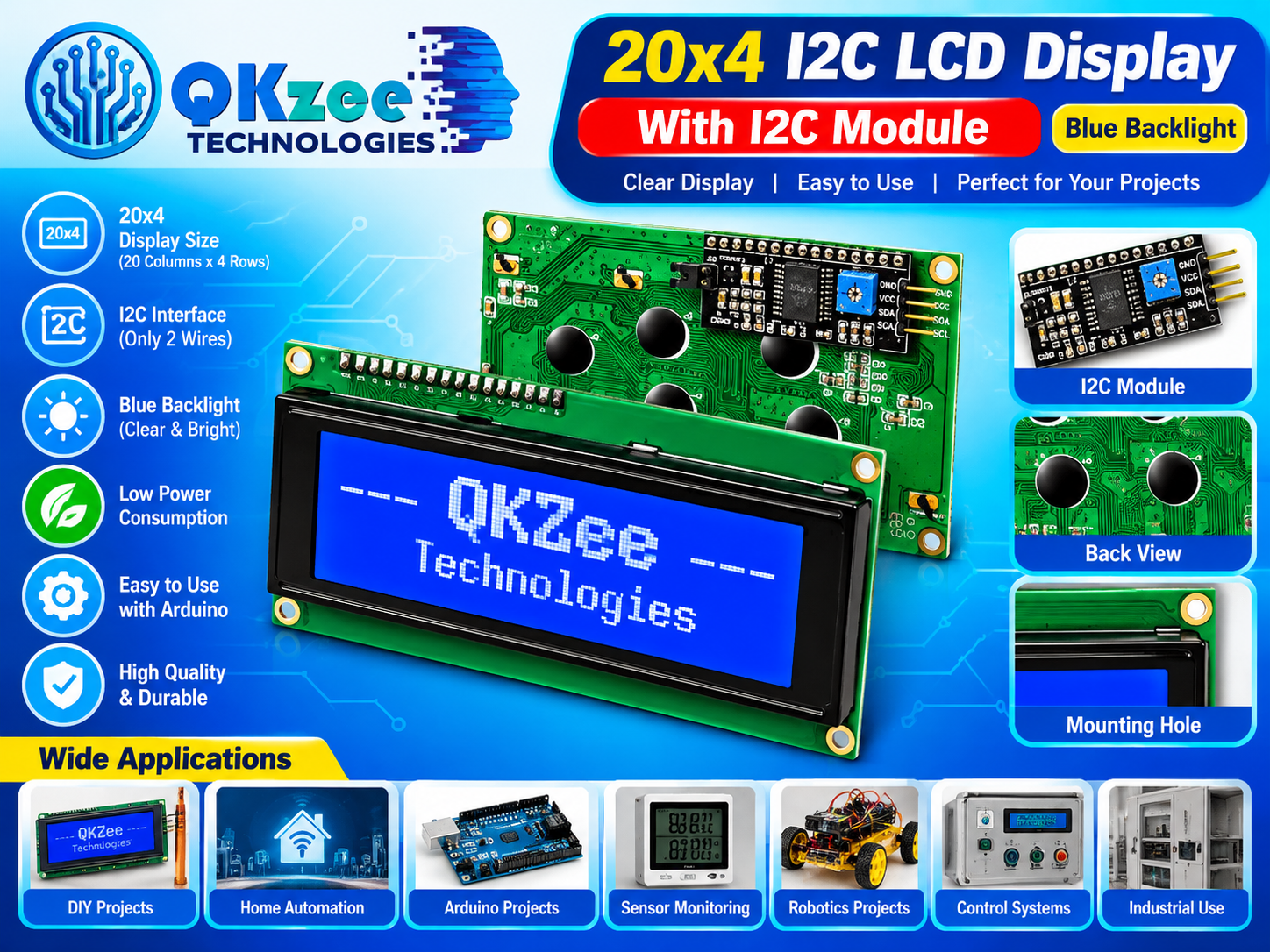
Bigger display, fewer wires! This 20×4 I2C LCD (2004A) shows 20 characters across 4 rows — 80 characters total — with a bright blue backlight, and thanks to the pre-soldered I2C module it needs only 2 data wires (SDA, SCL) instead of the usual 10+. Ideal when your Arduino project needs to show sensor readings, menus, or status messages at a glance. Pairs perfectly with any Arduino board.
Key Features
- 20×4 character display (20 columns x 4 rows = 80 characters)
- I2C interface — only 2 data wires needed (SDA, SCL)
- Bright blue backlight, clear and easy to read
- I2C module pre-soldered with contrast adjustment potentiometer
- Low power consumption
- Easy to use with Arduino via the LiquidCrystal_I2C library
- Mounting holes for clean panel installation
- High quality and durable
How to Connect (Usage)
Wire the module to your Arduino UNO as follows:
| Pin on module | Connect to |
|---|
| VCC | 5V |
| GND | GND |
| SDA | A4 |
| SCL | A5 |
Arduino Example Code
Needs the LiquidCrystal_I2C library — install it from Arduino IDE Library Manager:
#include <Wire.h>
#include <LiquidCrystal_I2C.h>

LiquidCrystal_I2C lcd(0x27, 20, 4);

void setup() {
  lcd.init();
  lcd.backlight();
  lcd.setCursor(0, 0);
  lcd.print("QKZee Technologies");
  lcd.setCursor(0, 1);
  lcd.print("20x4 LCD Ready!");
}

void loop() {
}
Note: most modules use I2C address 0x27; if nothing appears, try 0x3F. See more display options in our LCD & Displays collection — find it under the Shop categories.
Applications
- Sensor monitoring dashboards (temperature, humidity, air quality)
- Home automation control panels
- Arduino projects needing text output
- Robotics Projects — see our Robotics parts
- Industrial control systems and timers
- DIY electronics and student projects — pair it with Sensors
Frequently Asked Questions
Q: How many wires do I need to connect it?
A: Just four in total: VCC, GND, SDA and SCL — only two carry data, which is the whole point of the I2C version.
Q: What is the difference between 20×4 and 16×2?
A: The 20×4 shows 80 characters (20 columns x 4 rows) versus 32 on a 16×2 — more than double the information on screen, great for menus and multi-sensor readings.
Q: What is the I2C address?
A: Usually 0x27 (a few modules use 0x3F). Set it in the LiquidCrystal_I2C lcd(…) line; if the screen stays blank, try the other address and adjust the contrast potentiometer on the I2C module.
Q: Does it work with ESP32 or Raspberry Pi?
A: Yes — it works with Arduino, ESP32 and Raspberry Pi (via I2C). Power it from 5V.
Q: Can I adjust the brightness/contrast?
A: The blue backlight is fixed, but the small blue potentiometer on the I2C module adjusts character contrast — turn it gently with a screwdriver until the text is crisp.
Q: Where can I buy a 20×4 LCD in Pakistan?
A: Right here — QKZee Technologies stocks it at our Hall Road, Lahore shop with Cash on Delivery across Pakistan.