- +92-302-8577025
- qkzeetech@gmail.com
- shop 20, 1st floor Al-khalil Center Hall Road , Lahore
Home automation is transforming the way we live. From controlling lights and fans to managing industrial automation systems, smart technology is now accessible to everyone — not just big companies.
For engineering students, hobbyists and even professionals, Arduino-based home automation is one of the most popular student projects and final year projects. It's affordable, customizable and a great way to learn electronics, coding and automation.
At QKZEE Technologies, we've seen hundreds of students from Lahore's Hall Road electronics market to top engineering universities build similar systems for engineering projects and DIY home automation.
To build your Arduino home automation system, you'll need:
| Component | Price / link |
|---|---|
| Arduino UNO R3 DIP (or Arduino Mega for more devices) | Rs 1,200 |
| 1-channel relay module — the diagram uses a 4-channel relay module (same wiring, one IN pin per channel); 4-channel modules are available on order — message us on WhatsApp | Rs 155 |
| ESP8266 NodeMCU — Wi-Fi control option (instead of Bluetooth) | Rs 590 |
| Jumper wires + MB102 breadboard | Rs 180 / Rs 250 |
| Bluetooth module HC-05 — for phone control; available on order — message us on WhatsApp (no listing yet) | On order |
| Power supply (5V for Arduino, 220V AC for appliances) + electrical devices (bulbs, fans, switches, power plugs, etc.) | As needed |
Tip: If you're sourcing parts in Pakistan, QKZEE Technologies, Hall Road, Lahore, is a great place to find affordable components for student projects and final year projects.
A relay module acts as a switch that allows Arduino to control high-voltage devices. This is essential for engineering projects where you need to control or switch appliances safely.
A relay has three output terminals: COM (common), NO (normally open) and NC (normally closed). For home automation we use COM and NO — the appliance stays OFF until the Arduino energises the relay, which closes COM to NO and switches the appliance ON. See our full guide: Relay Module with Arduino.
| Connection | Where it goes |
|---|---|
| Relay module VCC | Arduino 5V |
| Relay module GND | Arduino GND |
| Relay IN1 | Arduino D2 |
| Relay IN2 | Arduino D3 |
| Relay IN3 | Arduino D4 |
| Relay IN4 | Arduino D5 |
| HC-05 TX | Arduino RX (pin 0) |
| HC-05 RX | Arduino TX (pin 1) — see the 3.3V note below |
| Relay COM (each channel) | AC LIVE (phase) wire |
| Relay NO (each channel) | Appliance (one wire) |
| Appliance (other wire) | AC NEUTRAL wire, straight to the appliance — NOT through the relay |
⚠️ The AC wiring was garbled in the old post — read this carefully. For AC devices, the LIVE (phase) wire goes to the relay COM terminal, the appliance's other wire connects to the relay NO terminal, and the NEUTRAL wire goes directly to the appliance, not through the relay. The old text said "Natural Will Connected with Devices" — the word is Neutral, and it never passes through the relay. Always disconnect the power before wiring AC devices, and never wire mains live. Test everything with a 12V DC load first.
HC-05 notes: the HC-05 RX pin is a 3.3V pin — put a 1k + 2k voltage divider between the Arduino TX pin and the HC-05 RX pin (or use a level shifter). And disconnect the HC-05 while uploading code, because pins 0 and 1 are also the USB serial pins — the upload will fail while the module is connected.
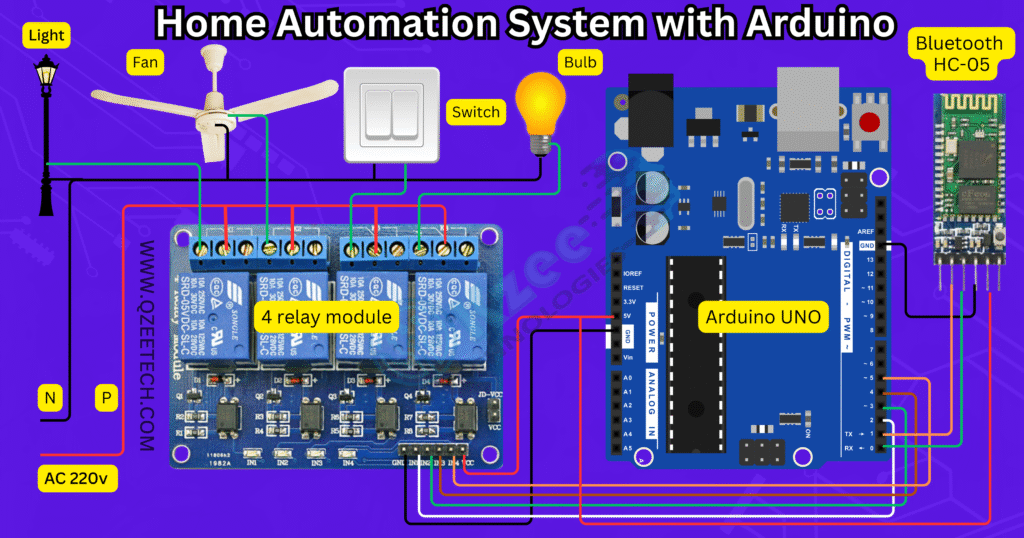
The old code was a single paragraph with no line breaks, and it only ever switched relay 1 — relays 2, 3 and 4 were set up but never used. Here is a complete program that controls all four relays from your phone over Bluetooth. Send a digit to switch a relay ON and the matching letter to switch it OFF, or 0 to switch everything OFF.
// Home automation: 4 relays controlled by Bluetooth (HC-05 on pins 0/1)
// Commands: '1'-'4' = relay ON, 'a'-'d' = relay OFF, '0' = all OFF
// (Most relay modules are active LOW: LOW = ON, HIGH = OFF)

int relay1 = 2;
int relay2 = 3;
int relay3 = 4;
int relay4 = 5;

void setup() {
  Serial.begin(9600);   // HC-05 default baud rate
  pinMode(relay1, OUTPUT);
  pinMode(relay2, OUTPUT);
  pinMode(relay3, OUTPUT);
  pinMode(relay4, OUTPUT);
  digitalWrite(relay1, HIGH);   // all relays OFF at start
  digitalWrite(relay2, HIGH);
  digitalWrite(relay3, HIGH);
  digitalWrite(relay4, HIGH);
}

void loop() {
  if (Serial.available() > 0) {
    char cmd = Serial.read();
    switch (cmd) {
      case '1': digitalWrite(relay1, LOW); break;    // relay 1 ON
      case 'a': digitalWrite(relay1, HIGH); break;   // relay 1 OFF
      case '2': digitalWrite(relay2, LOW); break;
      case 'b': digitalWrite(relay2, HIGH); break;
      case '3': digitalWrite(relay3, LOW); break;
      case 'c': digitalWrite(relay3, HIGH); break;
      case '4': digitalWrite(relay4, LOW); break;
      case 'd': digitalWrite(relay4, HIGH); break;
      case '0':
        digitalWrite(relay1, HIGH);
        digitalWrite(relay2, HIGH);
        digitalWrite(relay3, HIGH);
        digitalWrite(relay4, HIGH);
        break;
    }
  }
}
Pair the HC-05 with your phone (default PIN is usually 1234), open a Bluetooth terminal app, connect, and send 1 to switch the first appliance on and a to switch it off. This basic code can be expanded for DIY final year projects or industrial automation.
Whether you're a student at an engineering university, a DIY hobbyist, or part of an engineering service company, building a home automation system with Arduino is a rewarding project.
At QKZEE Technologies, we've helped countless students and professionals turn their final year projects into real-world solutions — from Hall Road workshops to industrial automation setups.
Start small, keep learning, and soon you'll have a smart home system that's uniquely yours.
The Arduino UNO (Rs 1,200), 1-channel relay module (Rs 155), NodeMCU (Rs 590), jumper wires (Rs 180) and MB102 breadboard (Rs 250) are available at QKZEE Technologies, Shop 20, 1st Floor, Al-Khalil Center, Hall Road, Lahore, and online at qkzeetech.com with delivery all over Pakistan — see the links above. The 4-channel relay module and the HC-05 Bluetooth module are available on order — message us on WhatsApp and we will arrange them for you.
If a relay clicks but the appliance stays off, or the Bluetooth module won't pair, message us — tell us which relay channel, what you sent from the phone, and whether the relay clicks, and we will help you find the fault.
Message us on WhatsApp Watch on YouTube
Why does the upload fail when the HC-05 is connected?
The HC-05 uses pins 0 and 1, which are also the USB serial pins. Disconnect the HC-05 (or at least its TX/RX wires) while uploading, then reconnect it.
Why is my relay ON when the Arduino starts?
Most relay modules are active LOW — the relay switches ON when the Arduino pin is LOW. The code sets all relay pins HIGH in setup() so they start OFF. If your module is active HIGH, swap the HIGH and LOW in the code.
Can I control more than 4 appliances?
Yes — use an 8-channel relay module (one IN pin per channel) or an Arduino Mega, which has more digital pins. The wiring and code pattern stay the same.
Do I need the HC-05, or can I use Wi-Fi instead?
Either works. The HC-05 is simpler for phone control in the same room. For control from anywhere, use a NodeMCU (ESP8266) with the Blynk app — see our IoT smart irrigation guide for the same relay pattern with Wi-Fi.
Is it safe to switch 220V with a relay module?
The relay itself is rated for mains, but the wiring must be right: LIVE to COM, appliance to NO, NEUTRAL straight to the appliance. Always disconnect the power before wiring, never work on it live, and test with a 12V DC load first.
What phone app do I use with the HC-05?
Any Bluetooth terminal app (for example "Serial Bluetooth Terminal" on Android). Pair the HC-05 (default PIN 1234), connect, and send the commands from the code — 1 on, a off, 0 all off.
A home automation system is one of the best first Arduino projects: one UNO, one relay module, one Bluetooth module and a phone. Get the relay wiring right — LIVE to COM, appliance to NO, NEUTRAL straight through — remember the module is active LOW, and test it with a small load before you connect mains. That is the whole project, and it works.