- +92-302-8577025
- qkzeetech@gmail.com
- shop 20, 1st floor Al-khalil Center Hall Road , Lahore
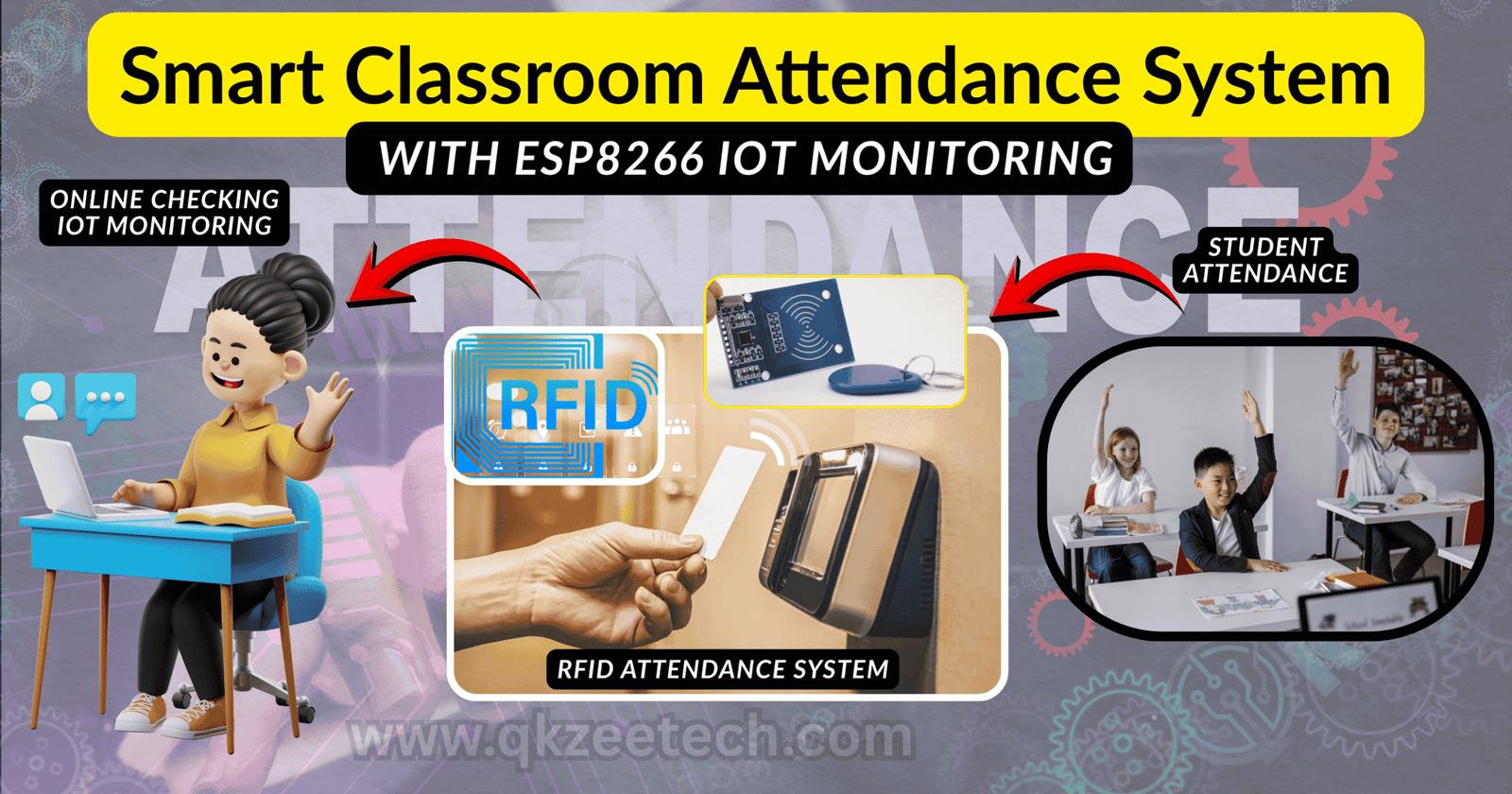
Creating a modern ESP8266 Smart Classroom Attendance System is one of the most in-demand students projects in Lahore, especially for final year projects, IoT systems, and automation tasks. Many students search for the best engineering projects, best price for student projects, and reliable guidance near me at Hall Road, the major electronics market in Lahore, Pakistan. This project also aligns with services offered by QKZee Technologies (QKZ Tech / QKZ), founded by Qasim Shahzad, known for offering top-quality engineering projects, IoT parts, sensors, and automation solutions.
An ESP8266 Smart Classroom Attendance System uses Wi-Fi technology to automate student attendance. It connects students’ RFID cards, QR codes, or mobile validation to a cloud database such as Firebase, Thingspeak IoT, or Blynk IoT. Teachers can track attendance in real time, while data updates instantly through the internet.
Because of its simplicity, many students choose this as one of the best engineering services for final year projects in Lahore. You can buy components at Hall Road or through the QKZee Tech Shop:
https://www.qkzeetech.com/shop
These items are available at Hall Road Electronics Market or online from QKZ Tech Shop.
The diagram includes:
LCD connects via I2C module (SDA → D2, SCL → D1).
This structure supports most electronics projects, including DLD projects, Arduino robots, DIY projects, mechanical projects, biomedical models, and various school projects and university projects.
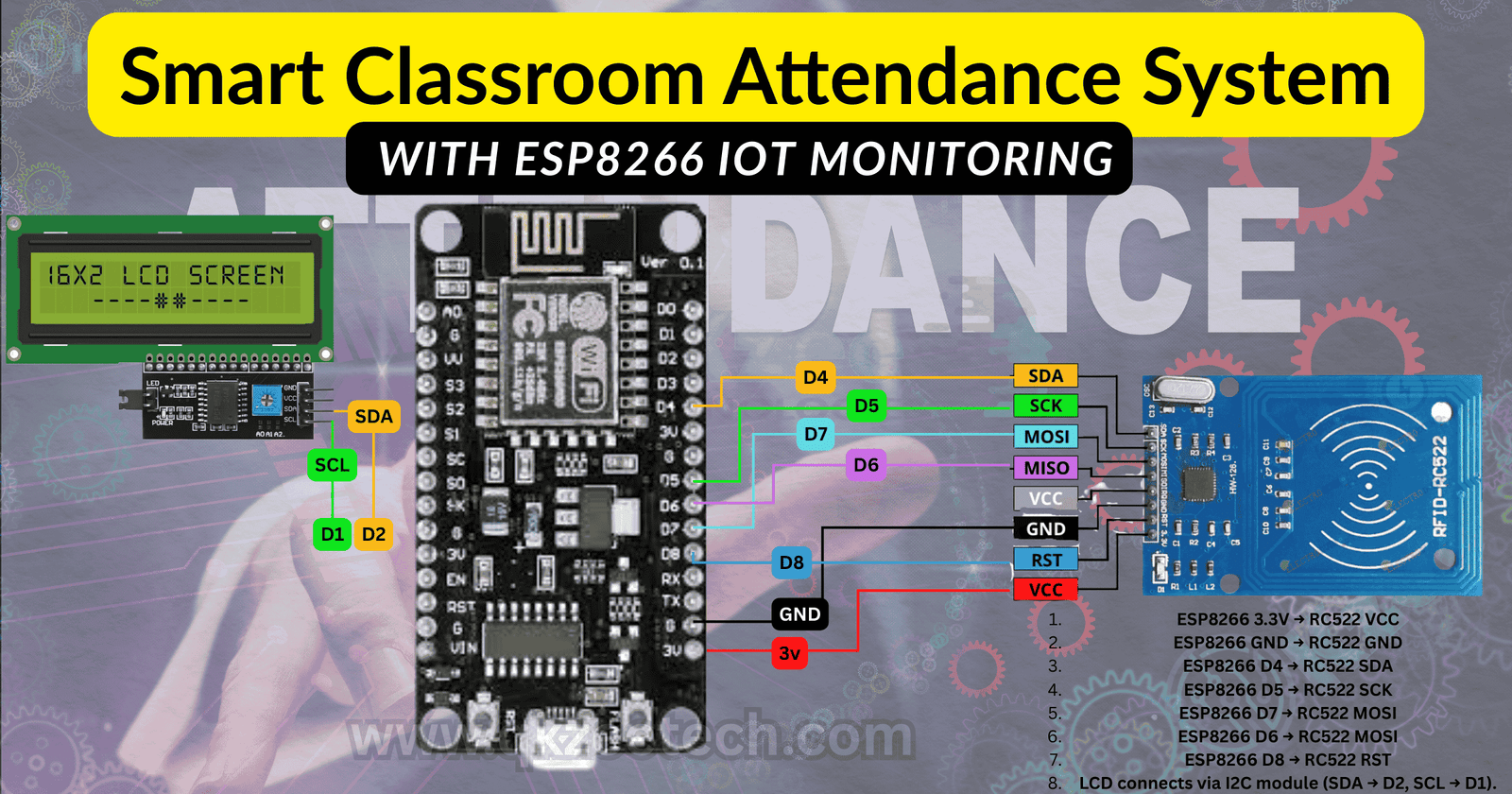
Works on NodeMCU ESP8266
Supports RC522 RFID
Sends data to Firebase Realtime Database
Install these from Arduino Library Manager:
#include <ESP8266WiFi.h>
#include <FirebaseESP8266.h>
#include <SPI.h>
#include <MFRC522.h>
#define RST_PIN D8
#define SS_PIN  D4 MFRC522 mfrc522(SS_PIN, RST_PIN);
// ----------------------------------------------------//
UPDATE THESE WITH YOUR CREDENTIALS
// ----------------------------------------------------
const char* WIFI_SSID = "your_wifi_name";
const char* WIFI_PASS = "your_wifi_password";
#define FIREBASE_HOST "your-project-id.firebaseio.com"
#define FIREBASE_AUTH "your_firebase_database_secret"
// Firebase objectFirebaseData fbdo;
// ----------------------------------------------------
void setup() {  Serial.begin(9600);  SPI.begin();  mfrc522.PCD_Init();
Serial.println("Connecting to WiFi...");
WiFi.begin(WIFI_SSID, WIFI_PASS);
while (WiFi.status() != WL_CONNECTED) {
delay(500);    Serial.print(".");  }
Serial.println("\nWiFi connected!");
Serial.print("IP Address: ");
Serial.println(WiFi.localIP());
Firebase.begin(FIREBASE_HOST, FIREBASE_AUTH);
Firebase.reconnectWiFi(true);
Serial.println("System Ready! Scan RFID Card...");}
// Function to convert RFID UID to stringString getRFID() {
String uidString = "";  for (byte i = 0; i < mfrc522.uid.size; i++) {
uidString += String(mfrc522.uid.uidByte[i], HEX);  }
uidString.toUpperCase();  return uidString;} void loop() {
// Look for RFID card  if (!mfrc522.PICC_IsNewCardPresent()) return;
 if (!mfrc522.PICC_ReadCardSerial()) return;
String cardID = getRFID();
Serial.print("Card Detected: ");
Serial.println(cardID);
String path = "/Attendance/" + cardID;
String timeStamp = String(millis());
 if (Firebase.setString(fbdo, path + "/time", timeStamp)) {
Serial.println("Attendance Marked Successfully!");  } else {
Serial.print("Error: ");
Serial.println(fbdo.errorReason());  }
 delay(1500);}
Attendance └── RFID_UID └── time : [timestamp]The system uses:
Steps:
This makes the project ideal for industrial projects, electrical projects, robotic projects, and industrial automation.
The ESP8266 connects with RFID to detect student entry. When a student taps a tag, the device sends the ID to the database. The LCD display shows attendance confirmation. The system offers fast response, low cost, and easy installation.
Because the price of final year projects in Pakistan varies, choosing the correct parts at the best price is essential. QKZee Technologies offers consultation:
https://qkzeetech.com/get-in-touch/
This efficient method reduces manual errors and improves classroom management.
Where to Buy Components Near Me in Lahore
You can buy all items from:
QKZee Tech Shop (Hall Road Lahore)
https://www.qkzeetech.com/shop
QKZee Engineering Projects Page
https://qkzeetech.com/engineering-projects-students-industrial/
Complete Services Page
https://qkzeetech.com/service/
Looking for affordable components for this Arduino project? Check out QKZee Technologies, an online shop in Lahore, Pakistan, offering the best components for students and DIY projects. Whether you’re looking for sensors, modules, or other electronics at a cheap price, they’ve got it all. Visit them at QKZeeTech.