- +92-302-8577025
- qkzeetech@gmail.com
- shop 20, 1st floor Al-khalil Center Hall Road , Lahore
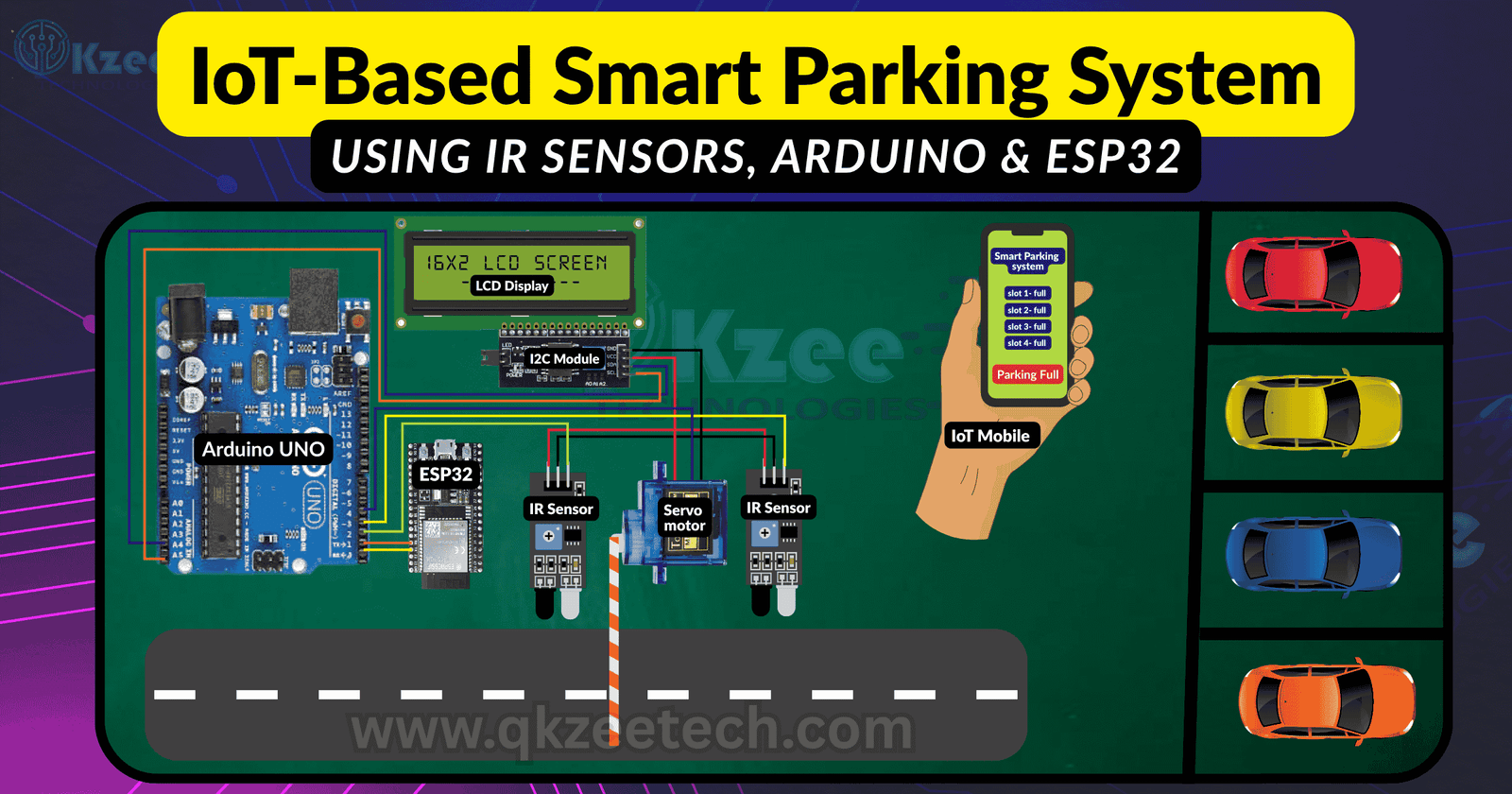
An IoT smart parking system uses connected sensors and microcontrollers to automatically detect available parking slots and update users or a cloud dashboard. These systems use IR (infrared) obstacle sensors placed at entry/exit or individual slots. When a car blocks an IR beam, the controller knows a spot is occupied. For example, one design uses an ESP32-CAM (with built-in Wi-Fi) plus two IR sensors: one at the entry gate and one at the exit. When a car triggers the entry sensor, the ESP32-CAM can open a barrier (via a servo motor) and send slot data to the cloud. This means a driver could check an app or display to see how many spaces are free. IoT connectivity (Wi-Fi) lets the system report status. In cities like Lahore, Pakistan – where students often search for “final year projects” and “best engineering projects near me” – local electronics markets (e.g. Hall Road) and providers like QKZee Technologies can supply parts and support qkzeetech.com. QKZee’s team (led by Qasim Shahzad) even offers consultation on student projects and IoT applications in Lahore.
Building this system requires:
Arduino UNO (or similar) – a microcontroller that reads sensor inputs and controls output.
ESP32 Development Board – a Wi-Fi microcontroller for IoT connectivity. The ESP32 can also run Arduino-style code.
IR Obstacle Sensors (Infrared) – to detect vehicles. These emit an IR beam and output a digital signal when the beam is broken. Typically, one IR sensor is placed at a gate (or each parking slot).
Servo Motor – to act as a barrier gate (optional). It rotates to allow or block a vehicle.
LCD Display (16×2) – to show available slots or messages (optional).
Breadboard & Jumper Wires – for prototyping the circuit.
Power Supply (5V adapter) – to power the boards and sensors.
Cloud Service or App – e.g. ThingSpeak, Firebase, or Blynk IoT, for remote monitoring of slot data.
Many of these parts (Arduino boards, ESP32 modules, sensors, wires, etc.) are sold at electronics markets in Lahore, especially around Hall Roadqkzeetech.com. Suppliers like QKZee Tech offer kits and modules at student-friendly prices and provide complete project kits for final year projects qkzeetech.com.
A typical parking system circuit connects the IR sensors and servo to the microcontroller. For example, one wiring layout places IR sensor outputs on Arduino pins D2 and D3, with the servo on D4. An I²C LCD can use A4 (SDA) and A5 (SCL) to display. All sensors share the 5V and GND rails. The Arduino UNO powers the sensors at 5V (or 3.3V if using an ESP32). Each IR sensor’s OUT pin goes to the Arduino’s digital input (e.g. D2, D3). The servo (on the right) is connected to D4. Power (5V) and ground rails run across the breadboard to supply all components. This assembly gives students a clear view of how to place sensors and a gate in a parking model.
The Arduino code initialises the pins, reads the IR sensors, updates slot counts, and controls the servo. Here is a simplified snippet (for two sensors and one gate):
#include <Servo.h>
Servo gateServo;
const int irEntry = 2; // IR sensor at entry
const int irExit = 3; // IR sensor at exit
int slots = 4; // total parking slots available
void setup() {
Serial.begin(9600);
pinMode(irEntry, INPUT_PULLUP);
pinMode(irExit, INPUT_PULLUP);
gateServo.attach(4); // attach servo on pin 4
gateServo.write(100); // gate closed (100 degree position)
}
void loop() {
// Car entering
if (digitalRead(irEntry) == LOW) {
if (slots > 0) {
slots–; // one car occupies a slot
gateServo.write(0); // open gate
delay(1000);
gateServo.write(100); // close gate
} else {
Serial.println(“Parking Full”);
}
Serial.print(“slots:”); Serial.println(slots);
delay(500);
}
// Car exiting
if (digitalRead(irExit) == LOW) {
slots++; // one car left, free slot
gateServo.write(0); // open gate
delay(1000);
gateServo.write(100); // close gate
Serial.print(“slots:”); Serial.println(slots);
delay(500);
}
}
This sketch sets up IR sensor pins as inputs (with pull-ups) and attaches a servo. When the entry IR sensor reads LOW (car present), it decrements slots, opens the gate, then closes it. If no slots remain, it prints “Parking Full.” When the exit IR sensor is triggered, it increments slots and operates the gate. All actions and the current slot count are sent over the serial port. (This matches examples where Arduino code manages sensors and displays slot count.) QKZee Tech can help students customize this code or create similar diagrams and Arduino programs for their projects at qkzeetech.com.
To make the system IoT-enabled, use an ESP32 to send data to the cloud. For instance, connect the Arduino’s serial output to the ESP32’s RX pin (via a logic-level converter if needed), or run similar code directly on the ESP32. The ESP32 code connects to Wi-Fi and pushes updates (e.g., to ThingSpeak) whenever it receives new slot data. Example (using ThingSpeak API):
#include <WiFi.h>
const char* ssid = “Your_SSID”;
const char* password = “Your_PASS”;
const char* host = “api.thingspeak.com”;
String apiKey = “YOUR_API_KEY”;
void setup() {
Serial.begin(9600);
WiFi.begin(ssid, password);
while (WiFi.status() != WL_CONNECTED) { delay(500); }
}
void loop() {
// Check for data from Arduino
if (Serial.available()) {
String data = Serial.readStringUntil(‘\n’);
if (data.startsWith(“slots:”)) {
int slots = data.substring(6).toInt();
// Send to ThingSpeak
if (WiFi.status() == WL_CONNECTED) {
WiFiClient client;
if (client.connect(host, 80)) {
String url = “/update?api_key=” + apiKey + “&field1=” + String(slots);
client.print(String(“GET “) + url + ” HTTP/1.1\r\n” +
“Host: ” + host + “\r\n” +
“Connection: close\r\n\r\n”);
client.stop();
}
}
}
}
delay(2000);
}
In this code, the ESP32 joins a Wi-Fi network and waits for serial data from the Arduino. When it reads a line like slots:3, it parses the slot count and makes an HTTP GET request to ThingSpeak, updating field1 with the current slots. This means you can log and plot parking availability online. (Alternatively, platforms like Blynk IoT, Firebase, or Thingspeak can be used – all allow real-time dashboards.) As one guide notes, Wi-Fi connectivity lets the ESP32 “allow remote monitoring of parking data from a web browser or mobile app. You may need to insert your Wi-Fi credentials and ThingSpeak API key (create a free account at thingspeak.com).
With this setup, whenever a car arrives or departs, the cloud database is updated accordingly. This enables features like a live parking map or automated alerts on a smartphone. Such IoT integration is often the highlight of a final year project, showcasing both hardware and software skills.
Students often ask how to buy all parts “near me”. In Lahore, the Hall Road electronics market is a prime destination. Shops there sell Arduinos, ESP32 boards, IR sensors, servos, LCDs, wires, and more at competitive prices. QKZee Technologies, located on Hall Road, is a top choice for engineering projects. They offer complete project kits (Arduino/ESP32 + all needed modules) and professional consulting. According to their site, QKZee “provides a wide range of electronic devices and components including Arduino, ESP, Raspberry Pi, sensors…qkzeetech.com. They also specialize in final year projects (FYPs): helping with circuit diagrams, writing Arduino code, and assembling models.
Moreover, QKZee advertises “the best engineering projects” and “best price” for students, with support from experts like Qasim Shahzad (CEO) . Whether you just need parts or full assembly, their engineers can guide you. In summary, after prototyping your IoT parking system, look for local services on Hall Road that match keywords like “Arduino projects Hall Road”, “final year projects Lahore”, etc. Many student reviews mention QKZee Tech for offering quality components and project guidance at student-friendly rates
Looking for affordable components for this Arduino project? Check out QKZee Technologies, an online shop in Lahore, Pakistan, offering the best components for students and DIY projects. Whether you’re looking for sensors, modules, or other electronics at a cheap price, they’ve got it all. Visit them at QKZeeTech.