- +92-302-8577025
- qkzeetech@gmail.com
- shop 20, 1st floor Al-khalil Center Hall Road , Lahore
Are you looking to add motor control to your Arduino projects? The L298N motor driver might be just what you need. This module is a popular choice for hobbyists and professionals alike, offering an easy way to control DC and stepper motors. From student projects to final year projects in engineering, the L298N is versatile and reliable. In this article, we’ll dive deep into the L298N, covering its description, pin configuration, uses, features, and more. Ready to get started? Let’s go! pin configuration, uses, features, and more. Ready to get started? Let’s go!
The L298N motor driver is a dual H-bridge motor driver module that allows for the control of the speed and direction of two DC motors or one stepper motor.
The L298N motor driver is a powerful module capable of simultaneously driving two DC motors or one stepper motor. It uses the H-bridge configuration, allowing full control over the motor’s direction and speed. The module can be easily interfaced with Arduino and other microcontrollers, making it a popular choice for various robotics and automation projects.
Voltage Requirements
The L298N can handle motor supply voltages from 5V to 35V, making it suitable for various applications.
The L298N is compatible with both DC motors and stepper motors, providing flexibility for various types of projects.
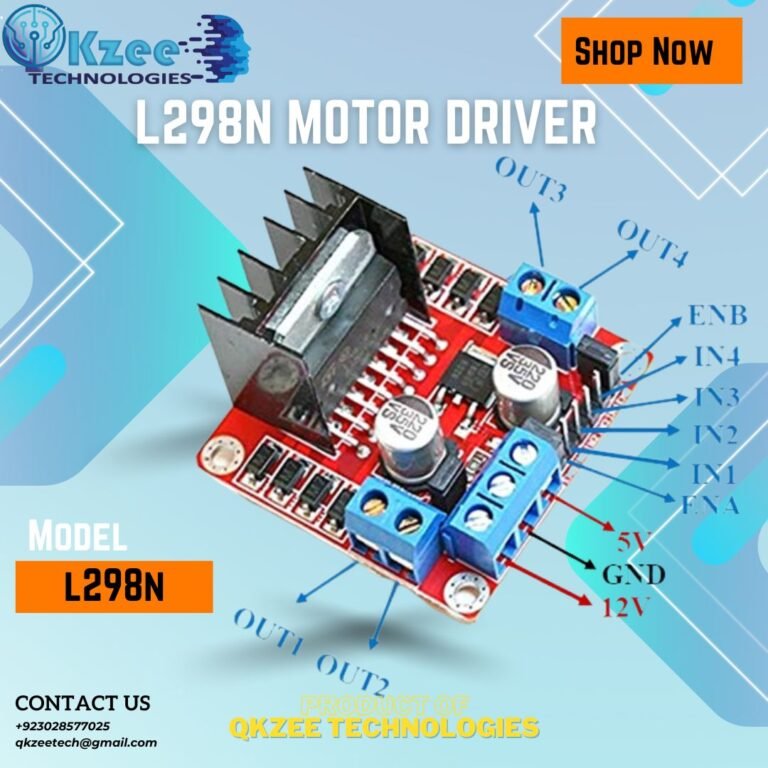
The L298N has several pins and terminals for connecting power, control signals, and motors. Here’s a breakdown of the key pins:
VCC: This pin is for the logic power supply, typically connected to a 5V source.
GND: This is the ground pin.
IN1, IN2, IN3, IN4: These pins are used to control the direction of the motors. IN1 and IN2 control the first motor, while IN3 and IN4 control the second motor.
OUT1, OUT2, OUT3, OUT4: These are the output pins connected to the motors. OUT1 and OUT2 connect to the first motor, and OUT3 and OUT4 connect to the second motor.
ENA, ENB: These are the enable pins for the motors. ENA enables the first motor, and ENB enables the second motor. These pins can be used to control the speed of the motors via PWM (Pulse Width Modulation).
12V: This pin is for the motor power supply, connected to a power source that matches the voltage requirements of the motors.
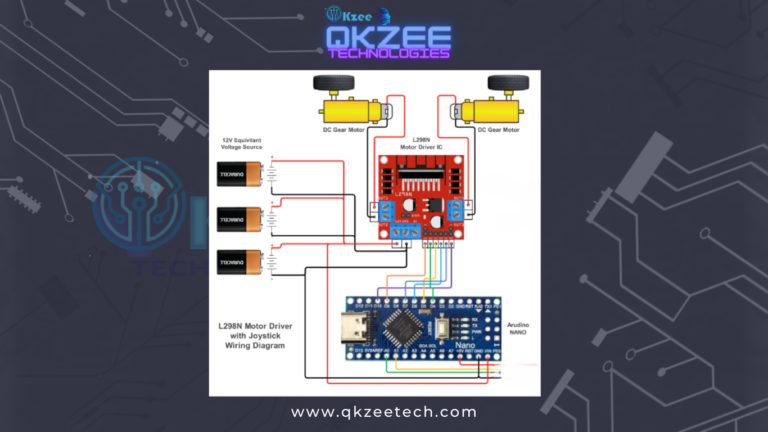
The ENA and ENB pins are used to enable the motors and control their speed using PWM signals from the Arduino. These pins must be connected to PWM-capable digital pins on the Arduino.
Ensure that the power supply for the motors is adequate and that the GND pins of the L298N and Arduino are connected to a common ground.
Connect your motors to the OUT1, OUT2, OUT3, and OUT4 pins. Ensure the connections are secure to prevent any loose connections.
					int IN1 = 10;
int IN2 = 9;
int ENA = 8;
int IN3 = 7;
int IN4 = 6;
int ENB = 5;

void setup() {
  pinMode(IN1, OUTPUT);
  pinMode(IN2, OUTPUT);
  pinMode(ENA, OUTPUT);
  pinMode(IN3, OUTPUT);
  pinMode(IN4, OUTPUT);
  pinMode(ENB, OUTPUT);
}

void loop() {
  digitalWrite(IN1, HIGH);
  digitalWrite(IN2, LOW);
  analogWrite(ENA, 255);

  digitalWrite(IN3, HIGH);
  digitalWrite(IN4, LOW);
  analogWrite(ENB, 255);

  delay(2000);

  digitalWrite(IN1, LOW);
  digitalWrite(IN2, HIGH);
  analogWrite(ENA, 255);

  digitalWrite(IN3, LOW);
  digitalWrite(IN4, HIGH);
  analogWrite(ENB, 255);

  delay(2000);
}
This code sets up the L298N motor driver with two motors. The motors will spin in one direction for 2 seconds, then reverse direction for another 2 seconds. The analogWrite fnction is used to control the speed of the motors via PWM
The L298N is perfect for controlling the speed and direction of DC motors in various projects.
Use the HC-06 to control lights, thermostats, and other home appliances from your smartphone or computer.
Use the L298N to control the movement of robots, providing precise control over speed and direction.
Ideal for student projects, the L298N motor driver helps in learning about motor control and electronics.
For final-year projects, the L298N offers a robust solution for complex motor control applications.
Used widely by Qkzee Technologies in their innovative projects and solutions.
Essential in engineering projects, especially those involving automation and robotics.
The
Check the power connections and ensure that the control pins are correctly connected and programmed.
Ensure adequate cooling and heat dissipation for the L298N module. Consider using a heatsink if necessary.
Verify that the power supply is sufficient for the motors being used. Check for loose connections.
Use heatsinks and ensure proper ventilation to prevent the module from overheating.
Make sure your power supply meets the voltage and current requirements of the motors and the L298N module.
Use proper fuses and protection circuits to prevent damage to your electronics.
Follow safety guidelines to avoid short circuits and other hazards.
The L298N can handle higher currents compared to the L293D, making it more suitable for larger motors.
Consider alternatives like the DRV8833 or the BTS7960 for more advanced features and higher-power applications.
You can control more than two motors by cascading multiple L298N modules.
Advanced users can modify the firmware to unlock additional features and optimize performance.
The L298N motor driver is a versatile and reliable component for adding motor control to your Arduino projects. Its ease of use, affordability, and robust performance make it a favorite among hobbyists and professionals alike. Whether you’re working on home automation, robotics, or simple motor control, the L298N is an excellent choice. Plus, if you’re in Lahore or shopping at Hall Road, you’ll find it to be one of Pakistan’s best solutions for motor control.