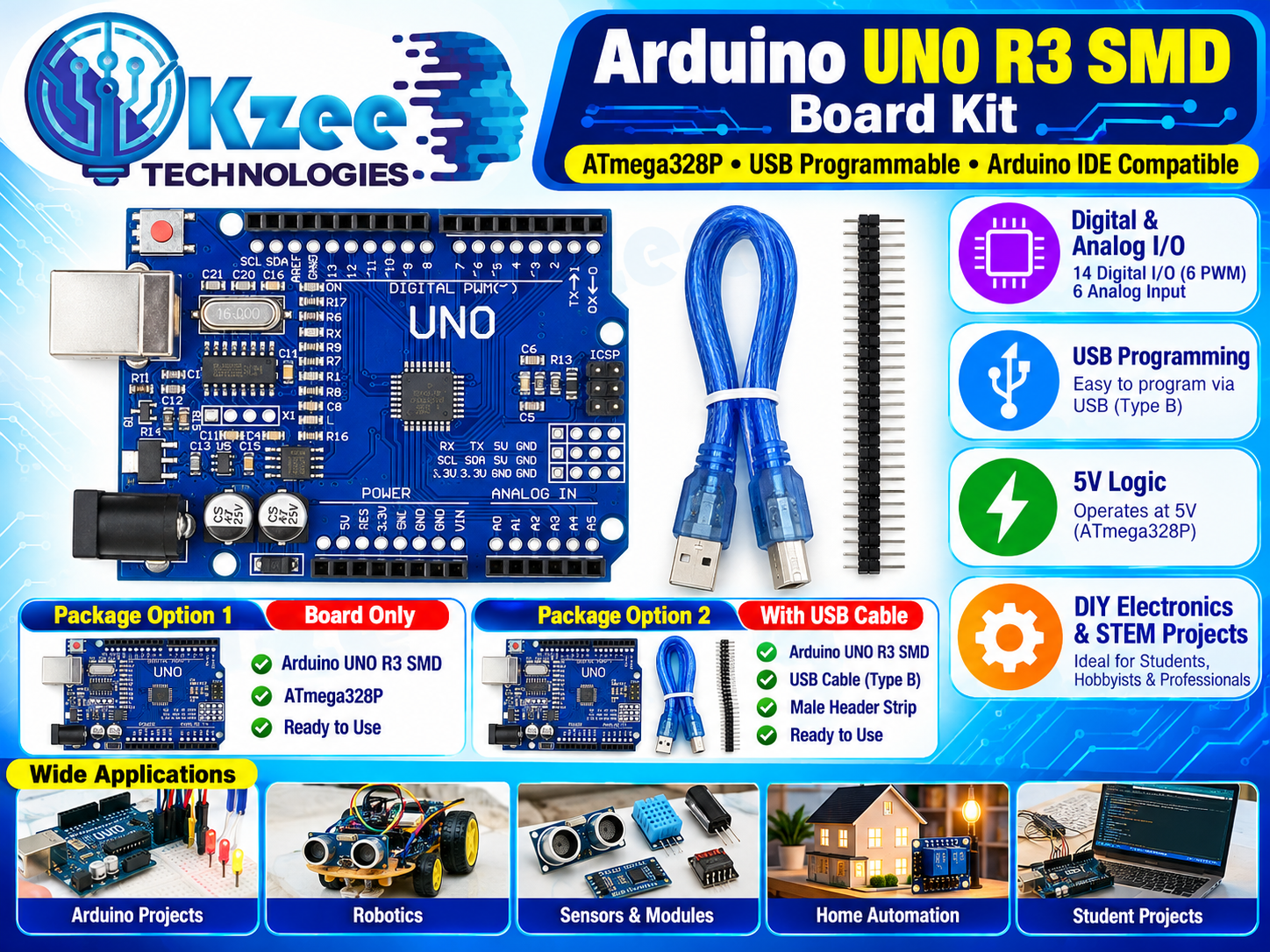
The classic Arduino Uno — in the compact SMD version! This Arduino Uno R3 SMD board kit runs the ATmega328P at 5V logic with 14 digital I/O pins (6 PWM) and 6 analog inputs, programs over USB Type B, and works with the standard Arduino IDE (just select "Arduino Uno"). Pick the package that suits you: board only, or the full kit with USB cable and male header strip.
Package Options
- Without USB Cable (Rs. 850): Arduino Uno R3 SMD board, ATmega328P, ready to use.
- With USB Cable (Rs. 1000): Arduino Uno R3 SMD board + USB cable (Type B) + male header strip, ready to use.
Key Features
- ATmega328P microcontroller, 5V logic
- 14 digital I/O pins (6 with PWM), 6 analog inputs
- USB Type B programming port
- Fully Arduino IDE compatible
- Compact SMD design
- Ideal for students, hobbyists and professionals
Getting Started (Usage)
- Choose your package above (with or without USB cable).
- Connect the board to your computer via USB.
- Open Arduino IDE, select Board: "Arduino Uno" and the correct Port.
- Upload the blink example below — the onboard LED (pin 13) should blink.
Arduino Example Code (blink)
void setup() {
  pinMode(LED_BUILTIN, OUTPUT);
}
void loop() {
  digitalWrite(LED_BUILTIN, HIGH);
  delay(1000);
  digitalWrite(LED_BUILTIN, LOW);
  delay(1000);
}
Pair it with our sensors and explore more boards in our Arduino Boards collection.
Applications
- Arduino Projects — the standard board for learning and prototyping
- Robotics — robot brains and controllers; see our Robotics parts
- Sensors and modules interfacing
- Home automation projects
- Student and university projects
Frequently Asked Questions
Q: What is the difference between the SMD and DIP versions?
A: The SMD version has its ATmega328P chip soldered directly to the board (more compact), while the DIP version has a removable chip in a socket. Both run the same code and have identical pins — pick whichever you prefer.
Q: Does it work with the Arduino IDE?
A: Yes — it is fully compatible. In Arduino IDE select Tools > Board > "Arduino Uno", choose the port, and upload.
Q: Which package includes the USB cable?
A: The "With USB Cable" package includes the USB cable (Type B) plus a male header strip. The "Without USB Cable" package is the board only.
Q: How do I power it?
A: Via USB, or 7–12V through the DC jack or the VIN pin. The onboard regulator handles the rest.
Q: Do I need to install drivers?
A: Most computers recognize the board immediately. If yours doesn’t, install the USB-serial driver matching your board’s USB chip.
Q: Where can I buy an Arduino Uno SMD in Pakistan?
A: Right here — QKZee Technologies stocks it at our Hall Road, Lahore shop with Cash on Delivery across Pakistan.