
MAX6675 K-Type Thermocouple Temperature Sensor Module with Probe
₨1,260 Original price was: ₨1,260.₨1,000Current price is: ₨1,000.
Cash on Delivery All over Pakistan
Direct Bank Transfer Payments
🚚 Delivery: Rs 350 all over Pakistan — 3 to 4 working days. Cash on Delivery available. Order on WhatsApp: +92-302-8577025 / +92-336-4459320
About this item
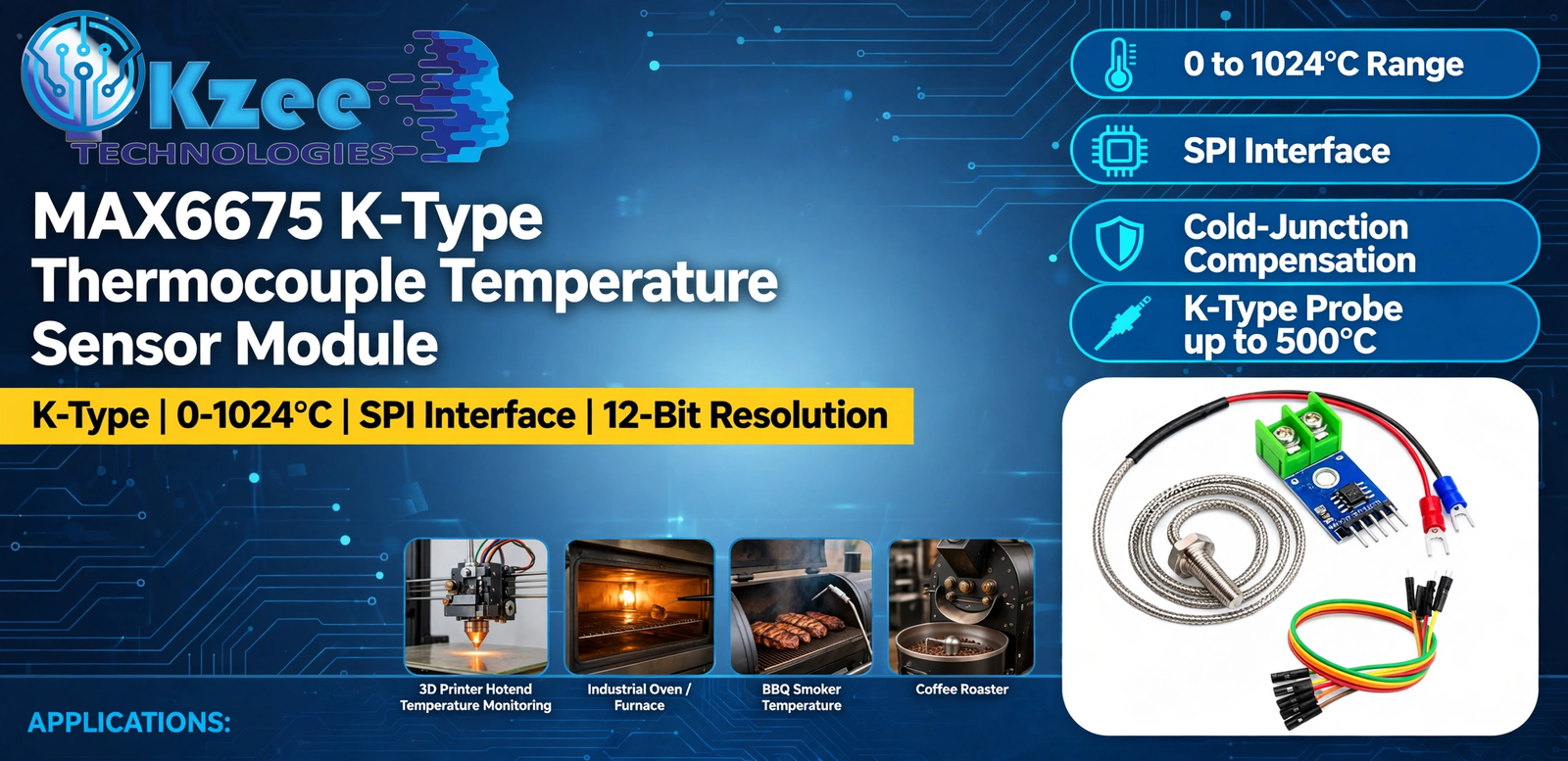
The MAX6675 is the easiest way to measure high temperatures with an Arduino. This HW-551 module reads a K-type thermocouple and gives you a clean digital temperature over SPI — no amplifier circuit to build, no calibration tables to look up. It measures from 0°C to 1024°C with 12-bit resolution (0.25°C steps), and the cold-junction compensation is built into the chip, so the reading stays accurate as the room temperature changes.
MAX6675 K-Type Thermocouple Temperature Sensor Module with Probe
The MAX6675 is the easiest way to measure high temperatures with an Arduino. This HW-551 module reads a K-type thermocouple and gives you a clean digital temperature over SPI — no amplifier circuit to build, no calibration tables to look up. It measures from 0°C to 1024°C with 12-bit resolution (0.25°C steps), and the cold-junction compensation is built into the chip, so the reading stays accurate as the room temperature changes.
The K-type probe in this package handles up to 500°C, with a steel braided cable and a threaded fitting that mounts straight into a 3D printer hotend, an oven wall or a smoker. Plug the module into an Arduino Uno, load the example below, and you get live temperature readings on the Serial Monitor in minutes.
What is included:
– 1 × MAX6675 K-type thermocouple converter module (HW-551)
– 1 × K-type thermocouple temperature probe, up to 500°C
Specifications:
– Chip: MAX6675, 12-bit ADC, 0.25°C resolution
– Temperature range: 0°C to +1024°C (probe up to 500°C)
– Thermocouple type: K-type
– Interface: SPI
– Operating voltage: 3.0 V to 5.5 V (5 V from Arduino Uno)
– Cold-junction compensation: built in
– Conversion time: about 0.22 seconds
Wiring with Arduino Uno:
– Module VCC → Arduino 5V
– Module GND → Arduino GND
– Module SCK → Arduino D13
– Module CS → Arduino D10
– Module SO → Arduino D12
– Thermocouple probe red wire → module + terminal, blue wire → module − terminal
Arduino example code (needs the max6675 library — install “MAX6675” from the Arduino Library Manager):
“`cpp
#include “max6675.h”
int thermoDO = 12; // SO
int thermoCS = 10; // CS
int thermoCLK = 13; // SCK
MAX6675 thermocouple(thermoCLK, thermoCS, thermoDO);
void setup() {
Serial.begin(9600);
Serial.println(“MAX6675 test”);
delay(500);
}
void loop() {
Serial.print(“Temperature: “);
Serial.print(thermocouple.readCelsius());
Serial.println(” °C”);
delay(1000);
}
“`
Applications:
– 3D printer hotend temperature monitoring
– Industrial oven and furnace temperature control
– BBQ smoker and grill temperature
– Coffee roaster temperature
– Home and workshop temperature logging projects
Frequently asked questions:
– What is the temperature range of the MAX6675? The chip measures 0°C to 1024°C; the included K-type probe is rated up to 500°C.
– Does it work with Arduino Uno? Yes — it uses SPI on pins D10, D12 and D13, and the example above runs on any Arduino Uno.
– Which library do I need? Install the “MAX6675” library from the Arduino Library Manager (Sketch > Include Library > Manage Libraries).
– Can it read below 0°C? No — the MAX6675 measures 0°C to 1024°C only.
– What is cold-junction compensation? The chip measures its own temperature and corrects the thermocouple reading for it, so you get an accurate result without extra parts.
Learn more in our guide: How to Use MAX6675 with Arduino (link: https://qkzeetech.com/how-to-max6675-arduino-temperature-sensor-guide/)
Order now — Cash on Delivery available all over Pakistan. Delivery Rs 350, 3–4 working days. WhatsApp +92-302-8577025.
Customer Reviews
Related products
-
Sale!

Buy Arduino Starter Kit UNO DIP in Lahore, Pakistan – Best Price for Beginners & DIY Projects
₨7,475Original price was: ₨7,475.₨6,500Current price is: ₨6,500. -
Sale!

Color Sensor GY-31 TCS230 TCS3200 Module for Precise Color Detection Best Price in Lahore, Pakistan
₨2,100Original price was: ₨2,100.₨1,825Current price is: ₨1,825. -
Sale!

IR Sensor Module – Infrared Precision Obstacle Detection for Robotics & Security Lahore, Pakistan
₨130Original price was: ₨130.₨115Current price is: ₨115. -
Sale!
Reviews
There are no reviews yet.