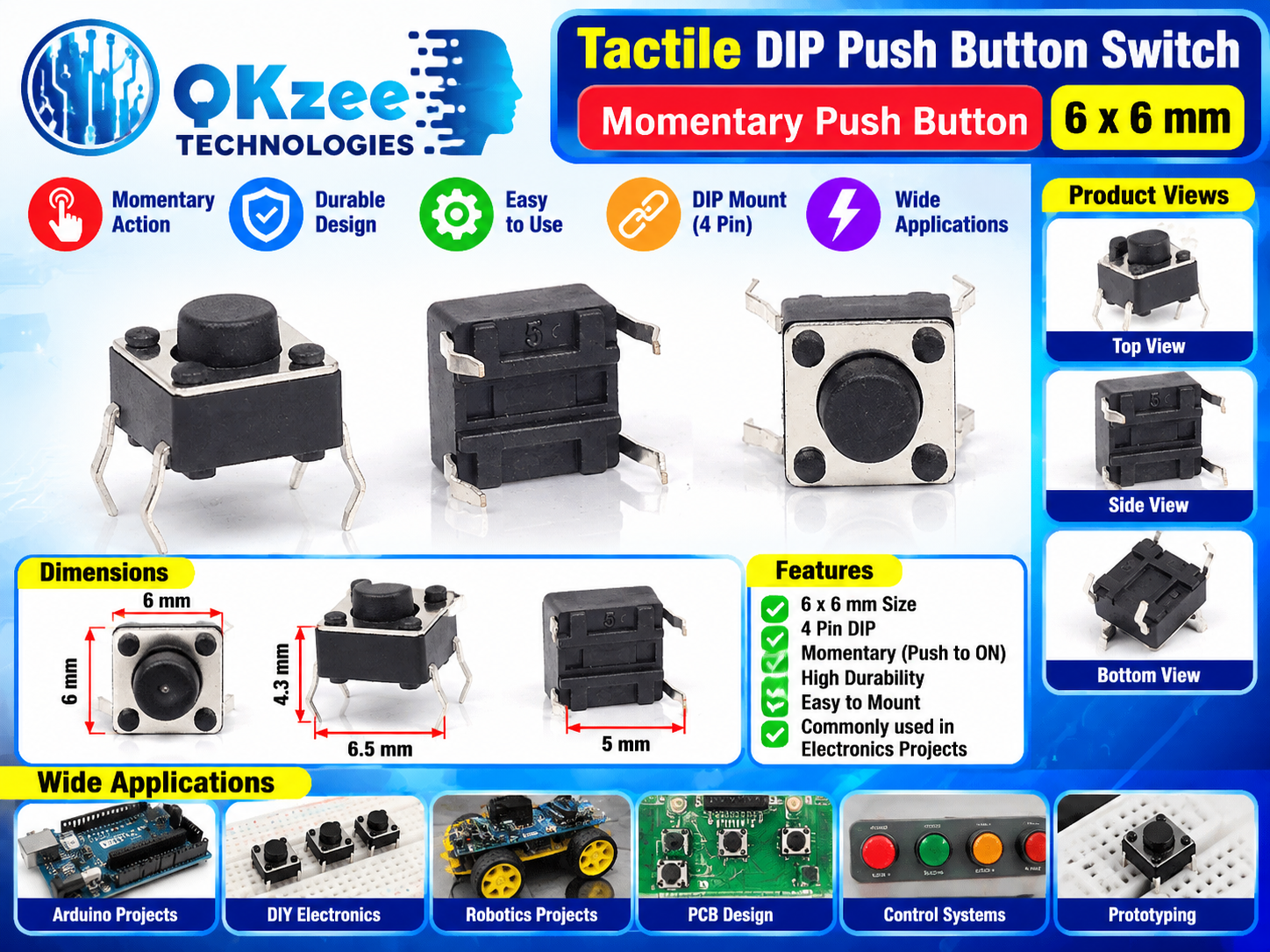
The classic click! This 6x6mm tactile DIP push button gives a satisfying momentary (push-to-ON) action — press and the circuit closes, release and it opens. The 4-pin DIP package fits standard breadboards and PCBs, making it the go-to button for Arduino projects, robotics builds and prototyping.
Key Features
- 6 x 6 mm tactile push button, 4.3 mm height
- Momentary action: push-to-ON, releases when you let go
- Crisp tactile click feedback
- 4-pin DIP mount — breadboard and PCB friendly
- Durable design, easy to use and mount
- The standard button for electronics projects worldwide
How to Connect (Usage)
The 4 pins are two internally-connected pairs — always use diagonally opposite pins. Wire it to your Arduino as follows:
| Button pin | Connect to |
|---|
| One diagonal pin | Arduino pin D2 |
| Opposite diagonal pin | GND |
Arduino Example Code
Uses the internal pull-up resistor, no extra parts needed:
const int BTN = 2;
void setup() {
  pinMode(BTN, INPUT_PULLUP);
  Serial.begin(9600);
}
void loop() {
  if (digitalRead(BTN) == LOW) {
    Serial.println("Button pressed");
    delay(200); // simple debounce
  }
}
Explore more parts for your builds in our Modules collection.
Applications
- Arduino Projects — user input, menu buttons, reset switches
- DIY Electronics and breadboard prototyping
- Robotics Projects — start/stop and mode buttons; see our Robotics parts
- PCB Design — panel and board-mounted controls
- Control Systems and automation panels
Frequently Asked Questions
Q: Is this a momentary or latching button?
A: Momentary (push-to-ON) — the circuit is only closed while you hold it down, and it springs back when released.
Q: How do I wire it to Arduino?
A: Use diagonally opposite pins: one to Arduino pin D2, the other to GND. Enable the internal pull-up with pinMode(2, INPUT_PULLUP) — no resistor needed. The example code above shows it working.
Q: Why does it have 4 pins?
A: The pins on each side are internally connected as pairs, so electrically it is one switch. Using diagonal pins across the button guarantees you get the two separate contacts.
Q: Does it fit a breadboard?
A: Yes — the 4-pin DIP package plugs straight into standard breadboards and PCBs.
Q: What voltage can it handle?
A: It is made for low-voltage logic circuits such as 5V or 3.3V Arduino and microcontroller inputs.
Q: Where can I buy tactile push buttons in Pakistan?
A: Right here — QKZee Technologies stocks them at our Hall Road, Lahore shop with Cash on Delivery across Pakistan.