- +92-302-8577025
- qkzeetech@gmail.com
- shop 20, 1st floor Al-khalil Center Hall Road , Lahore
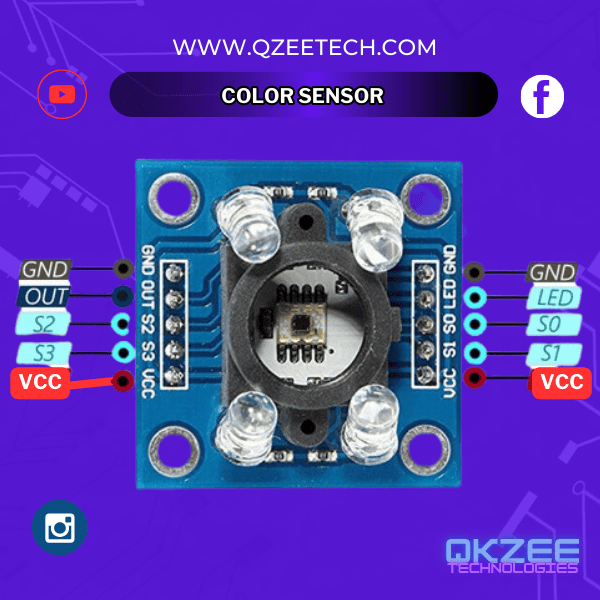
Are you working on student projects, engineering projects, or industrial automation? The TCS3200 color sensor is a powerful and versatile tool that can elevate your projects to the next level. Whether you’re a student in Lahore, an engineer in Pakistan, or a hobbyist exploring components on Hall Road, this blog will guide you through everything you need to know about the TCS3200 color sensor. At QKZee Technologies, we provide top-notch services and consultation to help you succeed in your projects.
The TCS3200 is a programmable color sensor that detects the red, green, and blue (RGB) components of light reflected from an object. It converts this information into a frequency signal that can be read by a microcontroller, such as an Arduino. This makes it an ideal choice for school projects, final year projects, and professional applications in automation and robotics.
The TCS3200 uses an array of photodiodes with color filters to measure light intensity. Here’s how it works:
Light Detection: Light passes through red, green, and blue filters and is directed onto photodiodes, which convert the light’s intensity into electrical current.
Frequency Conversion: A current-to-frequency converter inside the sensor chip transforms this current into a square wave frequency.
Color Interpretation: The microcontroller reads the frequency to determine the predominant color of the object.
Output: A square wave with a frequency proportional to the detected color’s intensity.
LED Illumination: Built-in white LEDs ensure accurate color sensing even in low-light conditions.
Ease of Use: Simple integration with microcontrollers like Arduino for student projects and engineering projects.
To connect the TCS3200 color sensor to an Arduino, follow these steps:
| TCS3200 Pin | Arduino Pin |
|---|---|
| VCC | 5V |
| GND | GND |
| S0 | D8 |
| S1 | D9 |
| S2 | D10 |
| S3 | D11 |
| OUT | D12 |
Connect the VCC pin of the TCS3200 to the 5V pin on the Arduino.
Connect the GND pin of the TCS3200 to the GND pin on the Arduino.
Connect the S0, S1, S2, and S3 pins to digital pins D8, D9, D10, and D11 respectively. These pins control the frequency scaling and filter selection.
Connect the OUT pin to digital pin D12 on the Arduino. This pin will read the frequency output from the sensor.
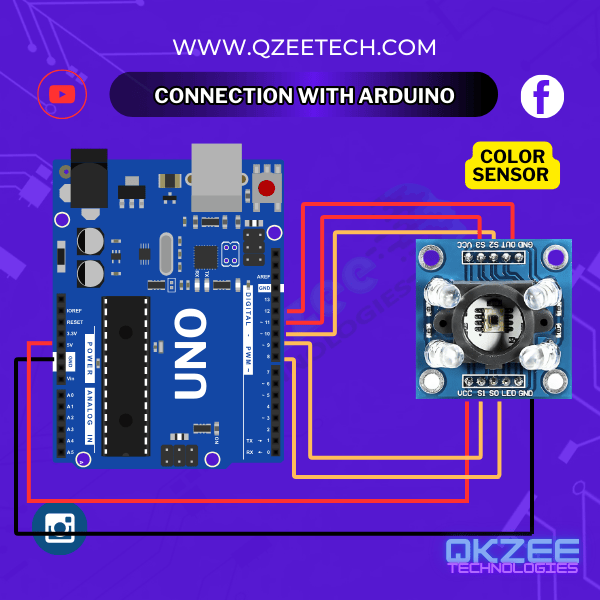
Here’s a simple Arduino code to read and interpret colors using the TCS3200 sensor:
					// Define pin connections
#define S0 8
#define S1 9
#define S2 10
#define S3 11
#define OUT 12

// Variables to store frequency values
int redFrequency = 0;
int greenFrequency = 0;
int blueFrequency = 0;

void setup() {
  // Set pin modes
  pinMode(S0, OUTPUT);
  pinMode(S1, OUTPUT);
  pinMode(S2, OUTPUT);
  pinMode(S3, OUTPUT);
  pinMode(OUT, INPUT);

  // Set frequency scaling to 20%
  digitalWrite(S0, HIGH);
  digitalWrite(S1, LOW);

  // Start serial communication
  Serial.begin(9600);
}

void loop() {
  // Read red component
  digitalWrite(S2, LOW);
  digitalWrite(S3, LOW);
  redFrequency = pulseIn(OUT, LOW);

  // Read green component
  digitalWrite(S2, HIGH);
  digitalWrite(S3, HIGH);
  greenFrequency = pulseIn(OUT, LOW);

  // Read blue component
  digitalWrite(S2, LOW);
  digitalWrite(S3, HIGH);
  blueFrequency = pulseIn(OUT, LOW);

  // Print the values to the Serial Monitor
  Serial.print("Red = ");
  Serial.print(redFrequency);
  Serial.print("  Green = ");
  Serial.print(greenFrequency);
  Serial.print("  Blue = ");
  Serial.println(blueFrequency);

  // Add a delay for readability
  delay(500);
}
Frequency Scaling: The code sets the frequency scaling to 20% by setting S0 to HIGH and S1 to LOW.
Color Filter Selection: The S2 and S3 pins are used to select the red, green, and blue filters.
Frequency Reading: The pulseIn() function reads the frequency of the square wave output from the sensor.
Serial Output: The RGB values are printed to the Serial Monitor for analysis.
The TCS3200 is widely used in various fields, including:
Color Sorting: Identifying and classifying objects based on color.
Robotics: Enabling robots to follow lines or detect colored markers.
Color Matching: Comparing an object’s color to a known standard.
Light Intensity Sensing: Measuring light levels in specific environments.
Whether you’re working on student projects in Lahore, industrial automation, or final year projects, the TCS3200 is an invaluable tool.
At QKZee Technologies, we are committed to providing the best services and consultation for your projects. Here’s why we’re the best place for your needs:
High-quality Arduino, sensors, and modules.
Expert guidance for school projects, engineering projects, and automation.
Affordable solutions for students and professionals in Pakistan.
Visit Qasim Shop or contact us for all your project requirements.
The TCS3200 color sensor is a game-changer for student projects, engineering projects, and industrial automation. Whether you’re in Lahore, exploring Hall Road, or anywhere in Pakistan, QKZee Technologies is here to help you succeed.
For more information or to get started on your next project, contact us today. Let’s bring your ideas to life!
Looking for affordable components for this Arduino project? Check out QKZee Technologies, an online shop in Lahore, Pakistan, offering the best components for students and DIY projects. Whether you’re looking for sensors, modules, or other electronics at a cheap price, they’ve got it all. Visit them at QKZeeTech.